
IPTV OTT Encoding & Streaming
DVB MPEG-TS Streaming Protocol
Understanding DVB MPEG-TS Protocol
MPEG Transport Stream (MPEG-TS or DVB-TS) is the standard format for digital video broadcasting. It is widely used in IPTV systems, satellite broadcasting, and cable television networks. MPEG-TS supports multiple transport mechanisms and is essential for professional streaming operations.
Stream from MPEG-TS from Dreambox-like DVB-S devices
Supported Transport Protocols
MPEG-TS can be encapsulated in udp unicast/multicast,
rtp or http format. Enter the source URL like:
udp://0.0.0.0:1234 (mpeg-ts over udp unicast)
udp://224.0.0.1:1234 (mpeg-ts over udp multicast)
rtp://224.0.0.1:1234 (mpeg-ts over rtp multicast)
http://192.168.0.1/mpeg-ts (mpeg-ts over http)
MPEG-TS Source Stream Selection
Single vs Multi Program Transport Streams (SPTS/MPTS)
If you are streaming from Single/Multi Program Transport Stream (SPTS/MPTS), it is possible to choose program / stream in the source you prefer to output. To do that, go to IPVTL advanced channel settings -> MPEG-TS Input and pick the stream by either Program Number or PID.
Stream Selection Strategy
By default, the video stream with max video size and the audio stream with max channels in the source are selected to output.
If Program Number is entered, all streams in that program are selected to output. Or else PID is entered, only the specified stream is selected to output. That means you need to choose audio, video or subtitle streams on your own.
Program ID and Stream PID Configuration
The following example shows stream list of a MPEG-TS source, and demonstrates how to select video (0x30), audio (0x40) and subtitle (0x195) stream from it.
Video
ID           : 48 (0x30)
Format       : AVC

Audio #1
ID           : 64 (0x40)
Format       : AC-3

Audio #2
ID           : 65 (0x41)
Format       : AC-3

Text #1
ID           : 405 (0x195)
Format       : DVB Subtitle

Text #2
ID           : 406 (0x196)
Format       : DVB Subtitle

Stream MPEG-TS with subtitles
Supported Subtitle Formats in DVB MPEG-TS
IPVTL is able to pass through the following subtitles in MPEG-TS format:
- DVB/DVD subtitle
- DVB teletext
- Closed Captioning (CEA/EIA-608, CEA/EIA-708)
Subtitle Passthrough Configuration
Closed caption is passed through automatically during transcoding. No extra steps required.
DVB subtitle and teletext stream is also passed through by default. You may also select subtitle you preferred using MPEG-TS Input settings above.
Stream MPEG-TS over UDP/RTP to OTT STB
UDP and RTP Transport Configuration
Choose MPEG-TS over UDP in Target Format, and enter target UDP/RTP address (IP:Port)
on receiver side. Both muticast and unicast addresses are allowed, for example
udp://192.168.0.1:1234 (udp unicast), or
rtp://224.0.0.1:1234 (rtp multicast).
CBR Compliance for STB Devices
OTT and STB devices typically require strict compliance with MPEG-TS standards, such as constant bit rate (CBR) and accurate PCR periods. To stream to these devices, enable CBR and set appropriate values for both Video Bitrate and Mux Bitrate in channel settings. This will produce a CBR stream compliant with DVB ETSI TR 101 290.
Bitrate Configuration for MPEG-TS Multiplexing
Mux Bitrate must be higher than <Video bitrate> + <Audio bitrate>. For example, if video bitrate is set to 1600 Kbps and audio bitrate is 128 Kbps, Mux bitrate should be 2000 Kbps.

MPEG-TS Output Metadata Configuration
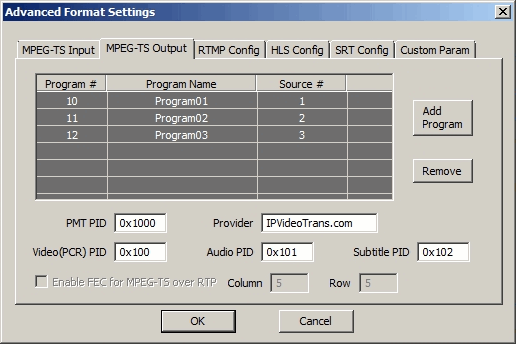
MPEG-TS metadata is configurable in IPVTL advanced channel settings -> MPEG-TS Output, including program number, program name, PMT PID, audio/video PID and provider name.

Network Considerations for UDP/RTP Streaming
For MPTS output instructions, see Advanced MPTS Config below.
Note that UDP/RTP streaming works on local networks only and is not designed for internet delivery, as UDP transport is unreliable. For remote stream delivery, consider using SRT protocol instead. Additionally, adaptive multi-bitrate streaming can optimize quality across varying network conditions.
UDP Multicast Configuration with Multiple Network Interfaces
If the host has multiple network interfaces, you can specify which one to use
for UDP multicast streaming by appending the "localaddr" option. For example:
udp://224.0.0.1:1234?localaddr=192.168.0.1.
Stream MPEG-TS over HTTP on local host interface
HTTP Port Configuration and Setup
First, configure HTTP Port to bind to your local network interface in Global Settings. The default port number is 9527. Change it if the port is already in use by other applications on your machine.
HTTP Output URL Format
Then select MPEG-TS over HTTP in Target Format. The output URL format is
http://<host_IP>:<http_port>/ipvt_ch##,
for example http://192.168.1.1:9527/ipvt_ch1. This URL can then be fed to
streaming servers or played in streaming players such as VLC.

Multi-Channel HTTP Streaming
Different HTTP output channels run on different TCP ports (starting from the base port 9527). Please ensure that these ports are available for listening.
HTTP Streaming Limitations and Alternatives
Although MPEG-TS over HTTP streaming can work over the internet, it is not designed to provide stream distribution to large numbers of end users. If you need such capabilities, consider using third-party media streaming servers such as Wowza or Nginx (see below). For better streaming protocols, explore HLS streaming or MPEG-DASH for adaptive bitrate delivery.
HTTP Stream Security with Access Control Lists
To secure HTTP output streams from being exposed to unexpected streamers, go to Global Settings and enter IP address ACL (access control list) rules. The ACL syntax supports both blacklist and whitelist, which is very like syntax in nginx:
# whitelist
deny all
allow 127.0.0.1/8

# blacklist
allow all
deny 1.2.3.4
Note: Use ACL rules with caution, as they also affect the web console interface.
Multi-Program Transport Stream (MPTS) Output Configuration
Creating MPTS from Multiple Sources
To create MPTS (multi-program TS) output, first set up multiple channels that will serve as MPTS sources and share the same output address. Currently, only MPEG-TS over UDP and SRT formats support MPTS output.
Channel Binding and Main Channel Selection
Once the source channels are configured, select one as the main channel. Bind the other source channels to the main channel by entering the main channel ID in their Bind columns.

Remember the MPTS mux bitrate is decided by the main channel. If CBR is required for the output stream, make sure to set the main channel's mux bitrate big enough to fit all muxed channels bitrate in total.
MPTS Program Configuration
In the main channel's MPEG-TS Output settings, add a program for each source channel (see screenshot above). For each program, specify your preferred program number and source number. The source number is counted sequentially from 1 and maps each bound source channel to the output program.
Starting MPTS Streaming
That's all. To start MPTS streaming, simply start the main channel. All source channels bound to it will start automatically.
Tip: Before starting the main channel, you can start each source channel separately to verify their functionality.
Enhanced MPEG-TS Streaming Features
Hardware Acceleration for MPEG-TS Transcoding
For superior encoding performance with MPEG-TS streams, consider accelerating your transcoding pipeline with:
- NVIDIA GPU acceleration for H.264/H.265 encoding
- Intel GPU integration for efficient transcoding
- NETINT VPU hardware for professional broadcast quality
Related Streaming Protocols and Features
Explore complementary streaming technologies for different use cases:
- HLS streaming protocol for wide device compatibility
- MPEG-DASH for adaptive bitrate streaming
- RTMP live streaming for broadcast distribution
- SRT protocol for reliable low-latency streaming
- Seamless streaming transitions for broadcast reliability
- Professional video codecs selection and optimization