
IPTV OTT Encoding & Streaming
Hardware Acceleration with NETINT Quadra VPU
Understanding NETINT Quadra VPU Technology
What is NETINT Quadra Video Processing Unit?
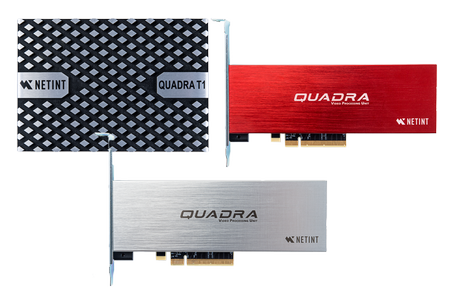 NETINT Quadra Video Processing
Unit (VPU) is a high-performance, energy-efficient hardware solution built on the Codensity
G5 ASIC architecture. Unlike general-purpose CPUs and GPUs, it is specifically designed for
video encoding, decoding, scaling, and overlay tasks. This specialized architecture makes it
ideal for high-volume applications while consuming significantly less power than CPU or
GPU-based solutions.
NETINT Quadra Video Processing
Unit (VPU) is a high-performance, energy-efficient hardware solution built on the Codensity
G5 ASIC architecture. Unlike general-purpose CPUs and GPUs, it is specifically designed for
video encoding, decoding, scaling, and overlay tasks. This specialized architecture makes it
ideal for high-volume applications while consuming significantly less power than CPU or
GPU-based solutions.
ASIC vs CPU vs GPU for Video Encoding
NETINT Quadra VPU utilizes purpose-built ASIC (Application-Specific Integrated Circuit) technology optimized exclusively for video transcoding. Unlike CPUs that perform general computing and GPUs that blend compute with graphics, ASIC encoders dedicate silicon to video operations alone. This results in superior energy efficiency, higher throughput per watt, and lower operational costs for massive-scale deployments.
Key Benefits of NETINT Quadra VPU
NETINT Quadra provides multiple advantages for professional streaming: exceptional energy efficiency reducing power costs compared to GPU solutions, high-density encoding with multiple concurrent streams per card, full acceleration for decoding, encoding, scaling, and overlay operations, support for H.264, HEVC, and AV1 codecs, and specialized optimization for broadcast and OTT platforms.
NETINT Quadra VPU Hardware Models
Quadra T1U Video Processing Card
The Quadra T1U is the enterprise-grade NETINT VPU card designed for data center environments. It delivers high-performance encoding and decoding capabilities in a single PCIe slot, supporting multiple simultaneous video transcoding sessions for broadcast and OTT workflows.
Quadra T1A and T2A Hardware Variants
NETINT offers T1A and T2A card variants with enhanced performance and codec capabilities. These newer generation models provide additional throughput, improved latency characteristics, and expanded fourth-generation codec support. Select the model that best matches your encoding requirements and bitrate targets.
Quadra Video Server Appliance
For simplified deployment, NETINT offers pre-configured Quadra Video Server appliances with VPU hardware, drivers, and software stack fully integrated and tested. This turnkey solution eliminates installation complexity and ensures immediate operation.
NETINT Quadra VPU Installation and Setup
Hardware Installation Steps
To install a Quadra VPU card (such as T1U, T1A, or T2A) to your system, follow the comprehensive instructions at NETINT Quadra Intro. If you prefer a turnkey solution, purchase Quadra video server directly with everything pre-installed, configured, and ready to use.
Driver and Library Configuration
NETINT provides driver packages and software libraries that must be installed before IPVTL can access VPU hardware. Download the latest NETINT drivers and codec libraries from the NETINT website or documentation portal. Ensure all dependencies are satisfied and system environment variables are configured to locate the VPU libraries.
After driver installation, execute ni_rsrc_list and
init_rsrc commands in your terminal to verify that the Quadra VPU is working
properly and detecting all available resources. Also ensure that libxcoder library is
installed and accessible to IPVTL.
NETINT Quadra VPU Encoding Configuration
Set up NETINT Quadra VPU Encoding
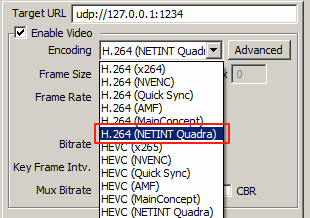
IPVTL supports H.264, HEVC, and AV1 encoding with NETINT Quadra. In channel configuration, select encodings with NETINT Quadra to enable hardware-accelerated video encoding on the VPU. All encoding operations will be transparently offloaded to the specialized ASIC hardware.
Supported Encoding Codecs
The NETINT Quadra VPU supports encoding in H.264 (AVC), HEVC (H.265), and AV1 codecs depending on your specific hardware model. Verify your card's codec capabilities and select the appropriate format for your content distribution platforms and device compatibility requirements.
Encoding Performance Optimization
Configure encoding presets in IPVTL (Quality, Balanced, or Performance) to tune the tradeoff between output quality and encoding speed. NETINT hardware automatically parallelizes encoding across available VPU resources to maximize throughput. For multi-bitrate streaming, configure separate IPVTL channels to distribute encoding sessions across multiple Quadra cards if available.
NETINT Quadra VPU Decoding Configuration
Set up NETINT Quadra VPU Decoding
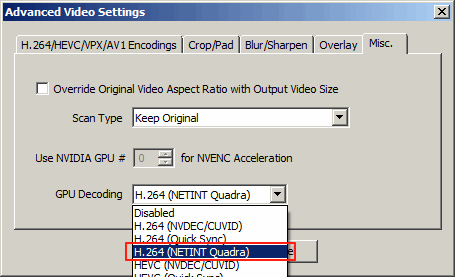
If the channel source video is encoded in H.264 or HEVC, you can enable NETINT Quadra VPU decoding to perform full VPU transcoding. Select H.264 or HEVC with NETINT Quadra (matching your source video format) in advanced video settings > Misc. > GPU Decoding. This performs all video decoding, resizing, and encoding operations (including deinterlacing if required) on the VPU, avoiding unnecessary data transfers between system memory and video memory.
Full VPU Pipeline Transcoding
When both NETINT Quadra decoding and encoding are enabled simultaneously, IPVTL creates a complete VPU pipeline where video data never leaves ASIC memory between decode and encode stages. This zero-copy architecture maximizes throughput while minimizing latency and memory bandwidth utilization.
Scaling and Overlay Operations
NETINT Quadra VPU includes dedicated hardware for video scaling (resizing to different output resolutions) and overlay operations (adding graphics, watermarks, subtitles). These tasks run on the same ASIC alongside encoding and decoding, delivering comprehensive video processing without CPU overhead.
NETINT Quadra Performance and Efficiency
Energy Efficiency Advantages
NETINT Quadra VPU is engineered for maximum energy efficiency compared to CPU and GPU alternatives. The dedicated ASIC architecture delivers industry-leading performance-per-watt metrics, significantly reducing operational power costs in data center and live streaming environments. This efficiency makes NETINT ideal for large-scale deployments where power consumption directly impacts profitability.
Concurrent Stream Capacity
Each NETINT Quadra VPU card can simultaneously encode and decode multiple video streams depending on bitrate, resolution, and codec complexity. The Codensity G5 ASIC distributes compute resources efficiently across all concurrent sessions without quality degradation or performance interference between streams.
Latency and Real-Time Performance
NETINT VPU delivers sub-millisecond encoding latency suitable for low-latency streaming applications, live production workflows, and real-time video monitoring. The ASIC architecture ensures deterministic performance without the variable latency characteristics of software or GPU approaches.
NETINT Quadra vs Alternative Hardware Acceleration
NETINT VPU Comparison with NVIDIA GPU
NETINT Quadra offers superior energy efficiency and density compared to NVIDIA GPU solutions. The ASIC approach consumes significantly less power per encoding session, making it more cost-effective for high-volume transcoding. See the NVIDIA GPU encoding guide for detailed performance comparison.
NETINT VPU Comparison with Intel GPU
Like Intel integrated GPUs, NETINT Quadra provides excellent encoding performance with lower power consumption than discrete enterprise GPUs. However, NETINT purpose-built ASIC offers better scaling for massive concurrency. Reference the Intel GPU encoding guide for comparative analysis.
Integration with IPVTL Streaming Features
NETINT Quadra VPU acceleration integrates seamlessly with IPVTL's core streaming capabilities:
- HLS streaming with VPU-accelerated multi-bitrate encoding
- MPEG-DASH for adaptive bitrate with NETINT hardware transcoding
- RTMP protocol delivery with hardware-accelerated encoding
- SRT low-latency streaming with VPU optimization
- Professional video codecs optimized for NETINT hardware
- Adaptive bitrate streaming using ASIC multi-encoding
- Video overlay and graphics with VPU-accelerated rendering
- Seamless streaming transitions with hardware-accelerated encoding