
IPTV OTT Encoding & Streaming
Hardware Acceleration with Intel iGPU and Arc GPU
Understanding Intel GPU Hardware Acceleration
What is Intel Quick Sync Video?
 Intel QSV (Quick Sync Video) is a hardware-accelerated
video encoding and decoding technology integrated into Intel HD/UHD graphics cores found in
most Intel processors. It enables fast, efficient video transcoding by offloading video
processing tasks from the CPU to a dedicated on-chip video engine, significantly reducing
power consumption and processing time. Quick Sync provides professional-grade performance
with minimal computational overhead.
Intel QSV (Quick Sync Video) is a hardware-accelerated
video encoding and decoding technology integrated into Intel HD/UHD graphics cores found in
most Intel processors. It enables fast, efficient video transcoding by offloading video
processing tasks from the CPU to a dedicated on-chip video engine, significantly reducing
power consumption and processing time. Quick Sync provides professional-grade performance
with minimal computational overhead.
Intel Quick Sync Processor Support
Intel Quick Sync Video is available on most Intel Core processors starting from the early 2nd generation (Sandy Bridge), and some Celeron and Xeon processors starting from the 4th generation (Haswell). Modern processors from 10th generation (Comet Lake) onward include Intel UHD Graphics 630 and newer, with significantly enhanced encoding capabilities. Visit Intel Product Specifications to find out if your processor is capable of Quick Sync Video.
Intel Arc: Discrete GPU Alternative
 Intel Arc is Intel's discrete GPU product, designed for
gaming, content creation, and compute workloads. Unlike Intel's integrated graphics (iGPU),
Arc GPUs are standalone graphics cards that feature their own high-performance GPU cores,
dedicated memory, and specialized media engines. Arc supports full hardware acceleration for
video encoding and decoding including H.264, H.265/HEVC, VP9, and AV1 codecs. Arc cards are
ideal for deployments requiring multiple simultaneous encoding sessions beyond iGPU
capabilities.
Intel Arc is Intel's discrete GPU product, designed for
gaming, content creation, and compute workloads. Unlike Intel's integrated graphics (iGPU),
Arc GPUs are standalone graphics cards that feature their own high-performance GPU cores,
dedicated memory, and specialized media engines. Arc supports full hardware acceleration for
video encoding and decoding including H.264, H.265/HEVC, VP9, and AV1 codecs. Arc cards are
ideal for deployments requiring multiple simultaneous encoding sessions beyond iGPU
capabilities.
Intel GPU Setup and Installation
Set up Intel Quick Sync Video on Windows
To set up Intel Quick Sync Video on Windows, desktop operating systems like Windows 10 and Windows 11 are recommended over server OS for optimal driver support. First, verify your processor supports Quick Sync Video. Then, download and install the latest Intel Graphics driver from the Intel website. Always install the most recent driver version, as outdated drivers could cause encoding failures, compatibility issues, or suboptimal performance. Windows Update often provides drivers automatically, but manually checking Intel's site ensures you have the absolute latest version.
Intel GPU Verification on Windows
After driver installation, you can verify Quick Sync functionality through Intel's Media Control Center (if available) or by checking Device Manager under "Display Adapters" to confirm Intel graphics is recognized.
Set up Intel Quick Sync Video on Linux
Setting up Intel QSV on Linux is a bit more complex than Windows. IPVTL utilizes Intel latest oneVPL interface on Linux platform. If you are using recent Linux distributions like Ubuntu 22.04 or later, you may find Intel media driver packages in the distribution repositories that can be installed via:
$ sudo apt-get install intel-media-va-driver-non-free libmfx1 libmfx-gen1* libvpl*
On older distributions, you may need to download and build drivers from source manually. For detailed instructions, visit Intel Client GPU Installation.
Verify Intel GPU on Linux
After driver installation, run vainfo in the terminal to verify that the
driver is working correctly. The output should display supported video formats and encoding
capabilities like below:
$ vainfo
libva info: VA-API version 1.4.0
libva info: va_getDriverName() returns 0
libva info: User requested driver 'iHD'
libva info: Trying to open /usr/lib/x86_64-linux-gnu/dri/iHD_drv_video.so
libva info: Found init function __vaDriverInit_1_4
libva info: va_openDriver() returns 0
vainfo: VA-API version: 1.4 (libva 2.4.0)
vainfo: Driver version: Intel iHD driver - 1.0.0
vainfo: Supported profile and entrypoints
      VAProfileNone                   : VAEntrypointVideoProc
      VAProfileNone                   : VAEntrypointStats
      VAProfileMPEG2Simple            : VAEntrypointVLD
      VAProfileMPEG2Simple            : VAEntrypointEncSlice
      VAProfileMPEG2Main              : VAEntrypointVLD
      VAProfileMPEG2Main              : VAEntrypointEncSlice
      VAProfileH264Main               : VAEntrypointVLD
      VAProfileH264Main               : VAEntrypointEncSlice
      VAProfileH264Main               : VAEntrypointFEI
      VAProfileH264Main               : VAEntrypointEncSliceLP
      VAProfileH264High               : VAEntrypointVLD
      VAProfileH264High               : VAEntrypointEncSlice
      VAProfileH264High               : VAEntrypointFEI
      VAProfileH264High               : VAEntrypointEncSliceLP
      VAProfileVC1Simple              : VAEntrypointVLD
      VAProfileVC1Main                : VAEntrypointVLD
      VAProfileVC1Advanced            : VAEntrypointVLD
      VAProfileJPEGBaseline           : VAEntrypointVLD
      VAProfileJPEGBaseline           : VAEntrypointEncPicture
      VAProfileH264ConstrainedBaseline: VAEntrypointVLD
      VAProfileH264ConstrainedBaseline: VAEntrypointEncSlice
      VAProfileH264ConstrainedBaseline: VAEntrypointFEI
      VAProfileH264ConstrainedBaseline: VAEntrypointEncSliceLP
      VAProfileVP8Version0_3          : VAEntrypointVLD
      VAProfileHEVCMain               : VAEntrypointVLD
      VAProfileHEVCMain               : VAEntrypointEncSlice
      VAProfileHEVCMain               : VAEntrypointFEI
If not, try environment variable LIBVA_DRIVER_NAME (set to iHD or i965):
$export LIBVA_DRIVER_NAME=i965$vainfo
And try LIBVA_DRIVERS_PATH if the media driver was manually installed
somewhere else than default locations.
Intel Quick Sync Video Encoding Configuration
Set up Intel Quick Sync Video Encoding
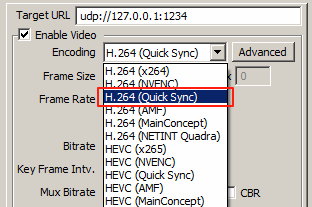
IPVTL supports H.264, HEVC, MPEG-2, VP9, and AV1 encoding with Intel Quick Sync. In channel configuration, choose encodings with Quick Sync to enable hardware-accelerated video encoding. All encoding operations will be transparently offloaded to the Intel GPU media engine.
Intel GPU Codec Support Matrix
Different Intel processors and GPU generations have different video codec capabilities. For example 9th/10th generation Intel Core processors (Intel UHD Graphics 630) supports H.264 and HEVC main profile only. The 11th generation (Intel UHD Graphics 750) and newer support HEVC main and scc (screen content coding) profiles. For comprehensive codec capabilities by hardware generation, visit Media Capabilities Supported by Intel Hardware.
VP9 and AV1 Encoding on Newer Intel Hardware
VP9 and AV1 support varies by Intel GPU generation. Modern Intel processors with latest iGPU / Arc discrete cards support both VP9 and AV1 encoding, making them suitable for next-generation streaming platforms requiring these codecs. Verify your specific hardware capabilities before relying on these newer codec options.
Encoding Performance and Preset Selection
Configure Quick Sync encoding presets (Quality, Balanced, or Performance) to tune the tradeoff between output quality and encoding speed. Intel hardware typically delivers consistent performance across all presets with minimal quality variance. Select Based on your targeting requirements and viewer expectations.
Intel GPU Video Decoding Configuration
Set up Intel Quick Sync Video Decoding
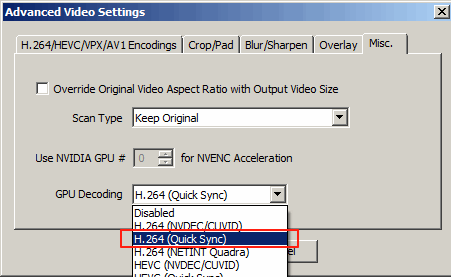
If the channel source video is encoded in H.264 or HEVC, you can enable Intel Quick Sync decoding to perform full GPU transcoding. Select H.264 or HEVC with Quick Sync (matching your source video format) in advanced video settings > Misc. > GPU Decoding. This performs all video decoding, resizing, and encoding operations (including deinterlacing if required) on the GPU, avoiding unnecessary data transfers between system memory and video memory.
Full GPU Pipeline Transcoding
When both Quick Sync decoding and encoding are enabled, IPVTL creates a complete GPU pipeline where video data remains in GPU memory throughout the entire decode-process-encode cycle. This zero-copy architecture maximizes throughput and minimizes latency, providing optimal performance for real-time streaming.
Hardware Deinterlacing and Scaling
Intel Quick Sync includes dedicated hardware for video deinterlacing (converting interlaced video to progressive) and scaling (resizing to different output resolutions). These operations run on the same GPU media engine as encoding/decoding, delivering comprehensive video processing without CPU overhead. This is particularly valuable for professional broadcast workflows working with legacy interlaced sources.
Intel GPU vs Alternative Hardware Acceleration
Comparison with NVIDIA GPU Acceleration
Intel Quick Sync offers excellent performance-per-watt efficiency compared to NVIDIA discrete GPUs. For budget-conscious deployments and systems with existing Intel processors, Quick Sync delivers competitive encoding performance. However, NVIDIA GPUs support a broader range of codecs and higher encoding session concurrency. See the NVIDIA GPU encoding guide for comparative analysis.
Comparison with NETINT VPU Hardware
NETINT Quadra VPU offers superior energy efficiency and higher concurrent stream capacity compared to Intel Quick Sync. For massive-scale deployments requiring hundreds of simultaneous encoding sessions, NETINT ASIC is more cost-effective. For typical IPTV/OTT applications, Intel GPU provides excellent performance with integrated hardware already in most systems. See the NETINT VPU guide for enterprise deployments.
Integration with IPVTL Streaming Features
Intel GPU acceleration integrates seamlessly with IPVTL's streaming capabilities:
- HLS streaming with GPU-accelerated multi-bitrate encoding
- MPEG-DASH for adaptive bitrate with Quick Sync transcoding
- RTMP protocol delivery with hardware-accelerated encoding
- SRT low-latency streaming with GPU optimization
- Professional video codecs optimized for Intel hardware
- Adaptive bitrate streaming using GPU multi-encoding
- Video overlay and graphics with GPU-accelerated rendering
- Seamless streaming transitions with uninterrupted GPU encoding